Welcome to the QChartist blog QChartist Community – Your way to financial freedom

May 11, 2026

Even if Warren Buffett says gambling is a bad idea, has he ever played in his life?

Even if Warren Buffett says gambling is a bad idea, has he ever played in his life?

The short answer is yes, Warren Buffett has gambled, but likely not in the way you’d expect. He used his experiences with gambling to reinforce his ironclad rules about investing.

Here is the breakdown of his relationship with “the house”:

1. Youthful Indiscretions

In his youth, Buffett was obsessed with probabilities. He frequented racetracks and placed bets on horses. However, these experiences mostly served as a wake-up call. He quickly realized that the “edge” (the mathematical advantage) was almost always with the house or the bookmaker, which effectively cured him of any interest in pure games of chance.

2. His Philosophy: “Being the Casino”

Buffett avoids casinos because he views gambling as a tax on hope and mathematical ignorance. To him, the difference is clear:

  • The Gambler bets on uncertain events with the odds stacked against them.
  • The Investor (Buffett) bets on productive companies with time and compound interest in their favor.

3. The Slot Machine Lesson

There is a famous anecdote about Buffett keeping a slot machine in his own home for his children.

The Goal? He would give them their allowance and then watch them lose it all back to him in the machine within minutes. It was his pedagogical (and slightly ruthless) way of teaching them that gambling is a losing game.

4. “Intellectual” Bets

While he avoids Blackjack tables, Buffett loves long-term bets based on statistics.

  • The Million Dollar Bet: In 2007, he wagered $1 million that a simple index fund (S&P 500) would outperform a selection of high-fee Hedge Funds over ten years.
  • The Result: He won by a landslide. This is the only type of “gambling” he respects: one where he is mathematically right from the start.

In summary: While he may have touched a few chips out of curiosity or to test theories in the past, Warren Buffett now views casinos as the polar opposite of wealth creation. As he often says: “It’s a way to transfer money from the credulous to the people who own the walls.”
January 3, 2026

Happy new year

After more than 15 years of hard work, 2026 was a pivotal year for me, where i turned from looser to winner.

Cheers🥂

November 27, 2025

AI and Crypto Pension Fund

“As humanoid robots with artificial intelligence start replacing human labor, we will no longer need to work to produce everyday goods. It only makes sense, then, that everyone on this planet should receive a guaranteed income of at least the minimum wage, without having to work. This is why we need a Crypto Pension Fund to distribute this money to all individuals.”

January 5, 2024

How To Run Exe Files On Android Devices?

An exe file is a Windows executable file, and it is used to run programs on your computer. Android doesn’t recognize .exe files, as it’s a different operating system than Windows. If so, can you run exe files on an Android device?

It is possible to run exe files on your Android smartphone without rooting. There are many third-party tools available that allow you to execute exe files directly on your Android phone.

Method #1: Use ExaGear Emulator to Run Exe Files

ExaGear is an emulator that allows you to run Windows exe files directly on your Android phone without rooting. However, programs and games with high requirements may not be compatible, such as Microsoft Office.

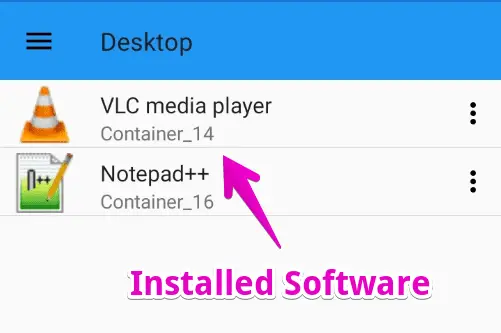
But, you can install several Windows exe programs including VLC, NotePad++, Audacity, and more.

Just follow these simple steps to enjoy your favorite Windows programs on Android.

Step #1: Download ExaGear And ZArchiver Apps

ExaGear emulator is not officially available on the Google Play Store, however, you can follow this link to download the ZIP file of this app easily.

ZArchiver app is needed to extract the downloaded ZIP file. You can also use any other file extractor app, such as RAR for Android, WinZip, or Android’s built-in file manager.

Step #2: Unzip Exagear Windows Emulator

Once you have installed the ZArchiver, or any similar app, open it on your mobile app development phone.

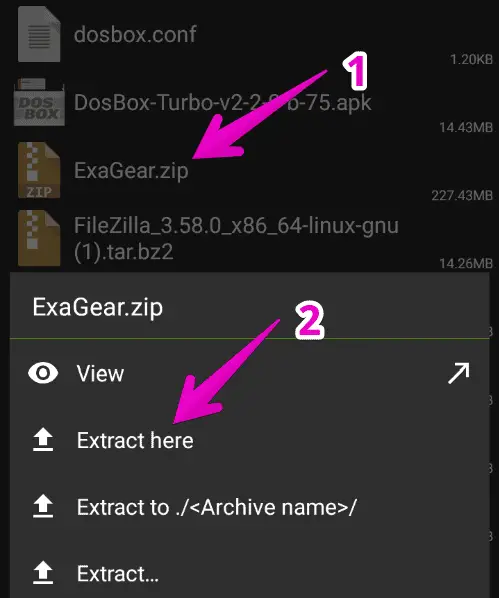
Then, navigate to the Download folder to locate the downloaded ExaGear ZIP file.

Tap on the ExaGear.zip file and select Extract here.

A new folder will be created to store the extracted files.

Step #3: Change the Files Path And Grant Permission

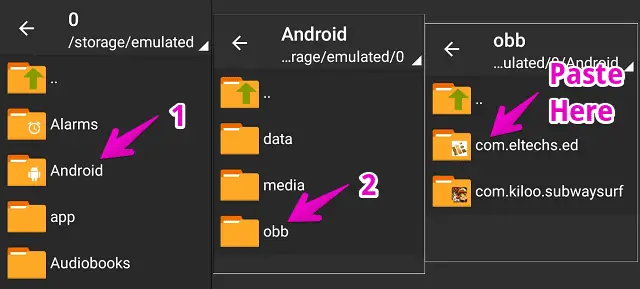
Now, open the extracted ExaGear folder which will have two items. Simply, copy the folder named “com.eltechs.ed”

Then, go to Android > open OBB folder, and paste the copied folder here.

Make sure to copy the folder in exact same path.

Step #4: Install ExaGear PC Emulator on Android

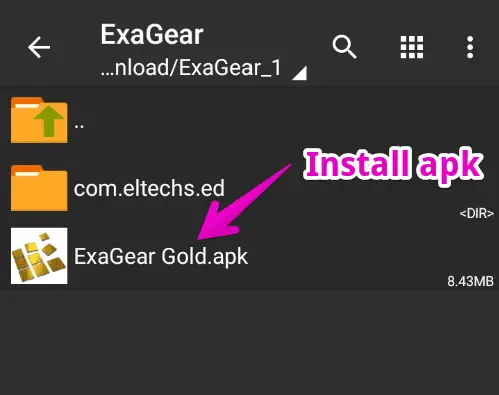
Once the folder is copied, we can now install the ExaGear app. Open the extracted ExaGear folder again.

Tap on the ExaGear Gold APK file and install it.

You may need to enable unknown source installation from settings before installing this app as it’s unavailable on the Play Store.

Step #5: Install Windows Exe Files

Until now, the ExaGear app must be installed on your phone. Now, we’re ready to install our Windows exe file on it.

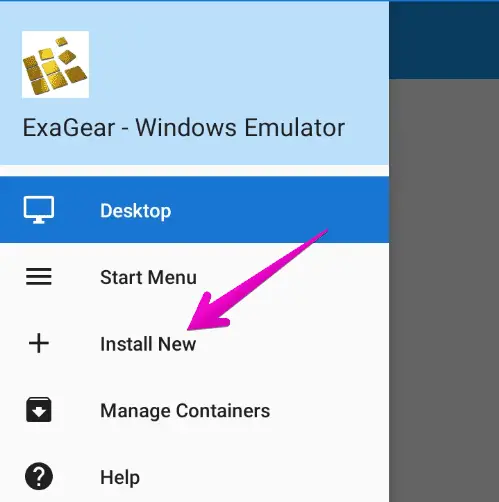
Launch this app > Tap three horizontal lines ☰ located at the top-left corner of the screen > Select Install New.

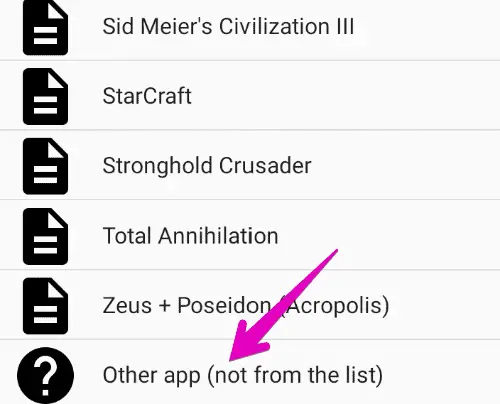
Swipe down and select Other app (not from the list) then, locate the exe file you want to install.

The installation process is the same as on a desktop PC.

If you face any error while installing the executable file, try downloading its lower version since it’s not able to install all heavy Windows software.

Step #6: Run The Installed Executable Program

Once the exe program installation process is completed, you can now run it on your Android device.

To do so, open the ExaGear app and you’ll find the installed exe files on the front.

Just tap on it and the application will launch.

This way, you can easily run your favorite Windows programs directly on an Android device.

February 21, 2023

Entertainment

Filed under: Entertainment — admin @ 2:20 pm

https://www.sandbox.game/en/

Welcome to The Sandbox Metaverse, an online gaming platform that offers a unique and immersive gaming experience. Monetize your NFTs in the blockchain. Create & Play!

Recommended for Metaverses : Meta Quest 2: Immersive All-In-One VR Headset

All the videos from Remi Gaillard: http://www.nimportequi.com

Some breakout games:
DX-Ball 1
DX-Ball 2
Rival Ball

Put fun effects on your webcam videos with ManyCam

Trackmania is a cool car game. You can create new tracks and play online (Trackmania Nations Forever) https://www.trackmaniaforever.com/

Powered by WordPress