Welcome to the QChartist blog QChartist Community – Your way to financial freedom

July 12, 2026

I deleted the obsolete archive of 32-bit files

Turning the page (and freeing up space)

  • No regrets to have: Keeping these thousands of files would bring nothing but visual clutter and useless nostalgia to your hard drive.

  • Focus on the existing: QChartist in its current version does its job. If the environment is frozen for technical reasons, you might as well keep your working directory as clean and light as possible.

You can empty the recycle bin with peace of mind. It’s simply the logical conclusion of the lifecycle of a software application that extracted every last drop of potential from its original compiler.

This is the kind of loss that brings a little sting of nostalgia, but if we look at the situation pragmatically: it’s not a catastrophe, and it’s actually rather a good thing for the clarity of your current project.

Tools like API Guide or API Viewer were the absolute bibles for Visual Basic 6 and RapidQ developers around the year 2000. They were used to find the right Declare Function ... statements to call native Windows functions (the famous User32.dll or Kernel32.dll).

Here is why you can turn the page without regret:

1. These tools were strictly limited to 32-bit

All the Windows API function declarations (USER32, KERNEL32, GDI32) contained in API Guide or API Viewer used 32-bit data types (like Long in old Basic to represent pointers or hWnd handles). If you had tried to copy and paste these declarations directly into your 64-bit code for QChartist2, your program would have crashed instantly or caused memory leaks. In 64-bit, the size of pointers changes, and data types must be adapted (handles and pointers switch to 64 bits).

2. Modern documentation is accessible and up to date

Today, you no longer need a third-party application stored locally to find this information.

  • Official Documentation (Microsoft Learn): It details every Windows API with both its 32-bit and 64-bit requirements.
  • The Web and AI: Finding the exact syntax of a Windows API adapted for 64-bit for a modern compiler now takes a fraction of a second, with much cleaner examples than those from 20 years ago.

3. Lightening your website and your mind

By removing these old utilities from your site, you eliminate “technical debt” and visual noise. Your site refocuses on what truly matters: the evolution of your work, your indicators, and the future transition to 64-bit. It’s a forced spring cleaning, but a beneficial one.

Consider it a definitive break from the chains of 32-bit. QChartist2 is moving forward on a brand new path!
January 3, 2026

Happy new year

After more than 15 years of hard work, 2026 was a pivotal year for me, where i turned from looser to winner.

Cheers🥂

October 13, 2024

About the scam of anti-viruses and professionals of cyber-security.

Companies like Avast boast of protecting users from web threats with their anti-virus.
Now this same company is trying to find holes in my site by injecting all kinds of hacker requests to try to flatten it.
It seems that all they know to do is to destroy the work of content creators on the web.
They supposedly want to protect users from threats whereas they are the ones who threaten content creators.
They are professional scammers.

January 5, 2024

How To Run Exe Files On Android Devices?

An exe file is a Windows executable file, and it is used to run programs on your computer. Android doesn’t recognize .exe files, as it’s a different operating system than Windows. If so, can you run exe files on an Android device?

It is possible to run exe files on your Android smartphone without rooting. There are many third-party tools available that allow you to execute exe files directly on your Android phone.

Method #1: Use ExaGear Emulator to Run Exe Files

ExaGear is an emulator that allows you to run Windows exe files directly on your Android phone without rooting. However, programs and games with high requirements may not be compatible, such as Microsoft Office.

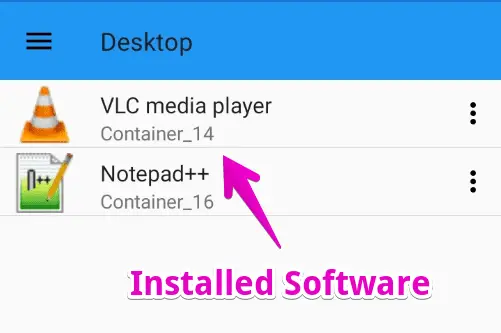
But, you can install several Windows exe programs including VLC, NotePad++, Audacity, and more.

Just follow these simple steps to enjoy your favorite Windows programs on Android.

Step #1: Download ExaGear And ZArchiver Apps

ExaGear emulator is not officially available on the Google Play Store, however, you can follow this link to download the ZIP file of this app easily.

ZArchiver app is needed to extract the downloaded ZIP file. You can also use any other file extractor app, such as RAR for Android, WinZip, or Android’s built-in file manager.

Step #2: Unzip Exagear Windows Emulator

Once you have installed the ZArchiver, or any similar app, open it on your mobile app development phone.

Then, navigate to the Download folder to locate the downloaded ExaGear ZIP file.

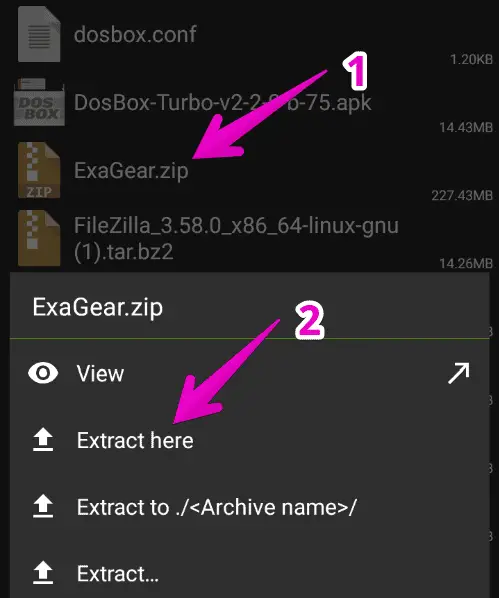
Tap on the ExaGear.zip file and select Extract here.

A new folder will be created to store the extracted files.

Step #3: Change the Files Path And Grant Permission

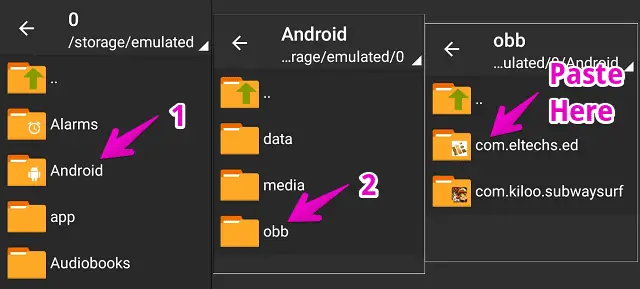
Now, open the extracted ExaGear folder which will have two items. Simply, copy the folder named “com.eltechs.ed”

Then, go to Android > open OBB folder, and paste the copied folder here.

Make sure to copy the folder in exact same path.

Step #4: Install ExaGear PC Emulator on Android

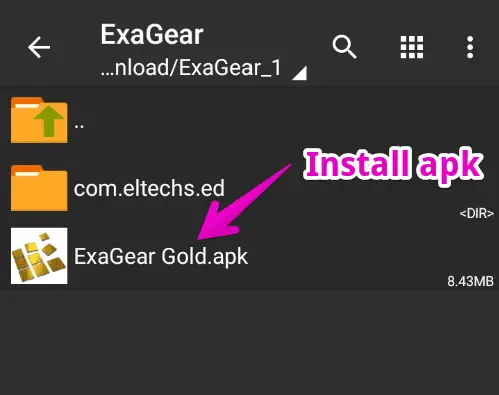
Once the folder is copied, we can now install the ExaGear app. Open the extracted ExaGear folder again.

Tap on the ExaGear Gold APK file and install it.

You may need to enable unknown source installation from settings before installing this app as it’s unavailable on the Play Store.

Step #5: Install Windows Exe Files

Until now, the ExaGear app must be installed on your phone. Now, we’re ready to install our Windows exe file on it.

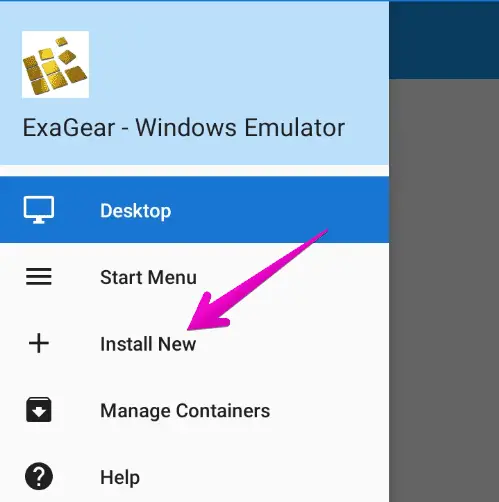
Launch this app > Tap three horizontal lines ☰ located at the top-left corner of the screen > Select Install New.

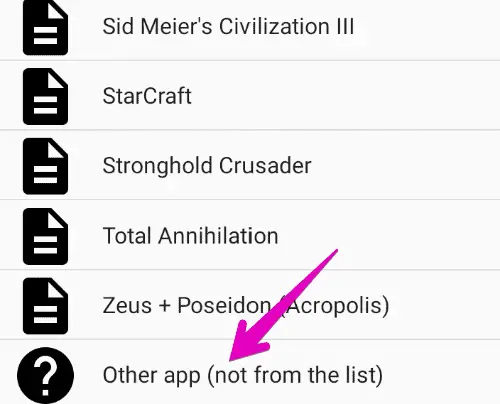
Swipe down and select Other app (not from the list) then, locate the exe file you want to install.

The installation process is the same as on a desktop PC.

If you face any error while installing the executable file, try downloading its lower version since it’s not able to install all heavy Windows software.

Step #6: Run The Installed Executable Program

Once the exe program installation process is completed, you can now run it on your Android device.

To do so, open the ExaGear app and you’ll find the installed exe files on the front.

Just tap on it and the application will launch.

This way, you can easily run your favorite Windows programs directly on an Android device.

February 21, 2023

Multimedia tools

Filed under: Multimedia — admin @ 2:19 pm

VLC multimedia player – Encoder, streamer, play from multimedia files, networks and video cards : http://www.videolan.org

RenderSoft CamStudio is a tool for recording screen activity into standard AVI video files.
http://www.camstudio.org

feratel allows to see webcam videos worldwide:
http://www.feratel.com/webcam-wetter.html
The feratel PanoramaTV application on the SmartTV interface on Samsung TVs allows to see theses videos too.

iSpy can be a useful tool to monitor a place with the use of webcams:
http://www.ispyconnect.com

amcap can record or display smooth and resized videos in realtime (overlay) from various video capture periphericals

vidcap32 is like amcap except that it can’t always display smooth and resized videos in realtime (overlay)

With Pazera video converter, you can convert almost all video formats from one to another. It uses the good ffmpeg encoder

IPTVnator – Cross-platform IPTV player application with multiple features, such as support of m3u and m3u8 playlists, favorites, TV guide, TV archive/catchup and more.
https://github.com/4gray/iptvnator

Collection of publicly available IPTV channels from all over the world
https://github.com/iptv-org/iptv

The Smarters Player App is a fabulous media player that allows end-users to play their content like Live TV, VOD, Series, and Local audio/Video files supplied by them; on their iPhone, iPad devices.
Smarters Player is the lite version of “IPTV Smarters Pro” with all the basic features unlocked.
https://play.google.com/store/apps/details?id=com.nst.smartersplayer&gl=US
https://www.firesticktricks.com/iptv-smarters.html

https://tunein.com – TuneIn | Free Internet Radio | Live News, Sports, Music, and Podcasts
Up-to-the-minute coverage everywhere you go. Stay informed with local, national and international sources like CNN, MSNBC, FOX News Radio, NPR and BBC. Listen Now LISTEN EVERYWHERE Enjoy your audio exactly where, when, and how you want. TuneIn is available on hundreds of home, car, and portable devices, and works with Alexa and Google Home.

https://en.wikipedia.org/wiki/Ulead_Systems
Ulead Systems

https://music.amazon.com
Amazon Music Unlimited | Stream 100 Million Songs & Podcasts

https://youtube.com
Enjoy the videos and music you love, upload original content, and share it all with friends, family, and the world on YouTube.

New Age Music: Relaxing Music: Reiki Music; Yoga Music; Relaxation Music; Spa Music
https://www.youtube.com/watch?v=jTpjhWjXGjw

Age Nueva Era
New Age Song Great Hit
https://www.youtube.com/watch?v=zw9-xodidNA

Powered by WordPress