Are you a freelance technical analyst ?
Join my new Facebook group : https://facebook.com/groups/1063608981646278
December 11, 2023
Are you a freelance technical analyst ?
December 7, 2023
Your Turn To Multiply Dollars !
Your Turn To Multiply Dollars !
November 25, 2023
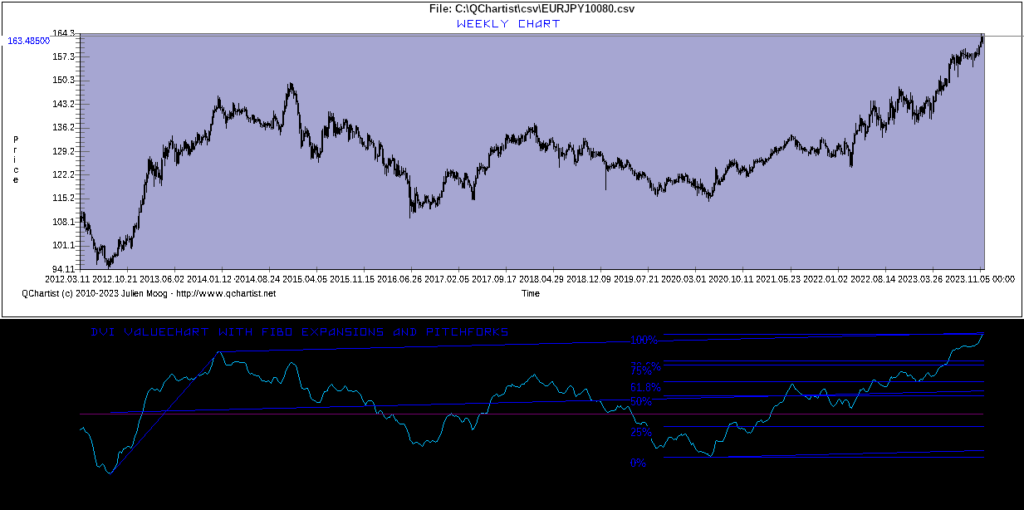
DVI_Valuechart indicator Weekly can be helpful
The DVI_Valuechart indicator on Weekly charts can be helpful to find major market reversals.
This indicator needs a volume information to work.
See the example below:
November 13, 2023
QChartist build 279 is out!
QChartist build 279 is out!
- Bug that limited the number of indicators solved. Now you can create and add new custom indicators, it won’t crash.
- New indicator : Anchored VWAP
- New indicator : Spud2
You can run update and recompile with QTStart
Enjoy!
November 4, 2023
Join the QChartist Community, your way to financial freedom !
Join the QChartist Community, your way to financial freedom !
As a member, you will gain access to : trading signals, ebooks, priority support, SEO, text ads, our newsletters, QCHARTIST tokens, goodies, the QChartist Exchange Market Place backed by Bitcoin and our referral program.
Join now, it’s free: https://www.qchartist.net/exchange/register.php

October 27, 2023
Looking for the best broker?
Looking for the best broker? Join SimpleFX: https://simplefx.unilink.io/n/IHUCLFY
FX #Forex #Stocks #Crypto #Equities #Commodities #broker #Indices
October 14, 2023
QChartist Exchange is a virtual Market Place backed by Bitcoin
Become a member of the QChartist Community and get access to the new Coin Exchange System.
QChartist Exchange is a virtual Market Place backed by Bitcoin.
It works exactly the way Forex Market does: buy our coins, follow the evolution of your shares, sell them at the right moment, make profits, and withdraw your Bitcoins.
You can start investing and making big money right now, while having fun. Because QChartist is getting more and more famous worldwide, share’s values are increasing!
Join now: https://www.qchartist.net/exchange/register.php
Enjoy!
August 17, 2023
Become a member of the QChartist Community ! It’s free.
Become a member of the QChartist Community ! It’s free.
As a member, you will receive : free trading signals, ebooks about trading, priority support, submission of your website in the directory, free ads, our newsletters, free membership to the community, free QCHARTIST tokens on the Ethereum Mainnet network, goodies, and many more.
Register now : https://www.qchartist.net/exchange/register.php
July 25, 2023
Recommended OS and WineHQ version for QChartist
Recommended OS and WineHQ version for QChartist
After intensive use of the QChartist software under Linux with WineHQ, i found that QC GUI often crashs with Wine >= 5. The problem seems to deal with the widgets of the wine Windows graphical API.
To avoid frequent crash of QC under Linux, please don’t install Wine 5 or superior, install Wine 4 or inferior. For Debian 12 use the deb packages from https://dl.winehq.org/wine-builds/debian/pool/main/ and install them manually with synaptic, apt, gdebi-gtk and dpkg -i.
It is also recommended to use the Gnome graphical interface. Avoid LXDE which is lite but often crashs.
Also run away from proprietary OS like Ubuntu, Lubuntu, Android, MacOS or Windows > 7. They often contain spyware or trackers.
Prefer a real GNU OS like Debian GNU Linux or FreeBSD.
I personally work with Debian GNU Linux OS, with the gnome-panel graphical interface ; and i had to install Wine 4.
QChartist seems to be much more stable since then.
If you need to stay under Windows the best option is Windows 7. Avoid Windows 11, QC crashs too much under this OS ; and the connection often timeouts.
To install Wine 4 .deb packages you can use synaptic and gdebi-gtk and dpkg -i
Under Debian, you may have to type this before using dpkg :
export PATH=/usr/local/sbin:/usr/local/bin:/usr/sbin:/usr/bin:/sbin:/bin
To install a specific version of a package with apt use : apt-get install winehq-stable=4.0.0~yourdistro-1
Before installing packages, you should enable i386 architecture for Wine with :
sudo dpkg –add-architecture i386 && sudo apt update
You may need to add the Wine repository PPA :
edit the sources.list file with :
nano /etc/apt/sources.list
and add this line in the file :
deb https://dl.winehq.org/wine-builds/debian/ bullseye main
(change the debian/ bullseye entry with your OS version)
then import the wine key with :
wget https://dl.winehq.org/wine-builds/winehq.key
apt-key add winehq.key
apt-get update
Under Linux, you may also need to associate .exe files with Wine. You may need to copy wine.desktop to /usr/share/applications or to $HOME/.local/share/applications/. You will find wine.desktop in /usr/share/doc/wine/examples/wine.desktop. Then you can associate .exe files with Wine under the Nautilus file explorer. I had to do this under Debian.
You may also need to download and copy these Fonts to ~/.wine/drive_c/windows/fonts/
After installing and running QC update.exe, to recompile QC with QTStart.bat, under the terminal use :
wineconsole cmd
c:
cd qchartist
qtstart.bat
Hope this helps
July 23, 2023
Do not choose Windows nor Ubuntu: choose GNU Debian !
That’s it, i finally migrated to GNU Debian Linux with gnome-panel and WineHQ.
No more spyware. And my PC works better. What a joy !
I encourage everybody to do the same.
Do not choose Windows nor Ubuntu nor MacOS : choose GNU Debian !
Now i can work peacefully.
Cheers.